Changelog
What changed in each release.
Polish from Obsidian's plugin review.
What's changed
- Works in pop-out windows. Ownsync's timers now follow the window they belong to, as Obsidian asks of plugins.
- Verifiable releases. Every release file is now signed by GitHub, so you can check it was built from this repository, at this tag:
gh attestation verify main.js -R humanglitch191/ownsync - Clearer about access. The README and the security page say plainly that Ownsync reads every file in your vault to sync it, and uses the clipboard only when you press Copy.
- Tidier server code, and the dashboard's links use the browser's own underline.
Updating
- The plugin: replace
main.js,manifest.jsonandstyles.cssin.obsidian/plugins/ownsync/with the files below. - Your server: run Update Ownsync when it suits you; nothing it does changes for you.
Still early
I'm the only one testing Ownsync so far, so keep a backup of your vault. Something off? Open an issue.
A small release, getting Ownsync ready for Obsidian's community plugins.
What's changed
- Safer saving. Notes are now written the way Obsidian recommends for plugins: in one step, so a save Obsidian makes at the same moment can't slip in between.
- A tidier recovery kit screen. Its sizing now comes from the stylesheet, with no hard-coded styles.
- Linux help. If Obsidian says "Encryption not available", the setup guide explains what it means and the one-line fix.
Updating
- The plugin: replace
main.js,manifest.jsonandstyles.cssin.obsidian/plugins/ownsync/with the files below. - Your server: nothing changed there apart from the version number. Run Update Ownsync when it suits you.
Still early
I'm the only one testing Ownsync so far, so keep a backup of your vault. Something off? Open an issue.
Your names on the dashboard, new vaults the guided way, and one-button server updates.
What's new
Your names, on your dashboard. Devices now show the name you gave them in Obsidian (Settings → Ownsync → Device name), and vaults show the name Obsidian uses. A name you type on the dashboard still wins, and the random ID is only used until a device has a name. These names are stored on your server as they are; everything else stays encrypted.
New vaults, the guided way. Settings → Ownsync → Add another vault opens your dashboard straight at the steps: connect, add your phone, done. It's the same flow as your first vault, and it notices the new vault arrive by itself. The old "Set up another vault" codes in Obsidian are gone. Codes now come only from your dashboard, each good for one vault within an hour.
Update your server with one button. Your server's GitHub repository (the one Cloudflare created when you deployed) gets an Update Ownsync action. When the dashboard says a new version is out, press Run workflow, and Cloudflare redeploys your server with the latest release. It runs only when you press it.
Your own domain. The setup guide now covers using an address like sync.yourdomain.com.
Updating
- The plugin: replace
main.js,manifest.jsonandstyles.cssin.obsidian/plugins/ownsync/with the files below, on each device. - Your server: if you deployed before today, add the update button once (how), then press Run workflow. From now on, your dashboard tells you when there's something new.
The plugin and server work with each other's earlier versions, so you can update them in any order.
Still early
I'm the only one testing Ownsync so far, so keep a backup of your vault while you try it. Something off? Open an issue.
A calmer site, phones that skip attachments, and devices you can name.
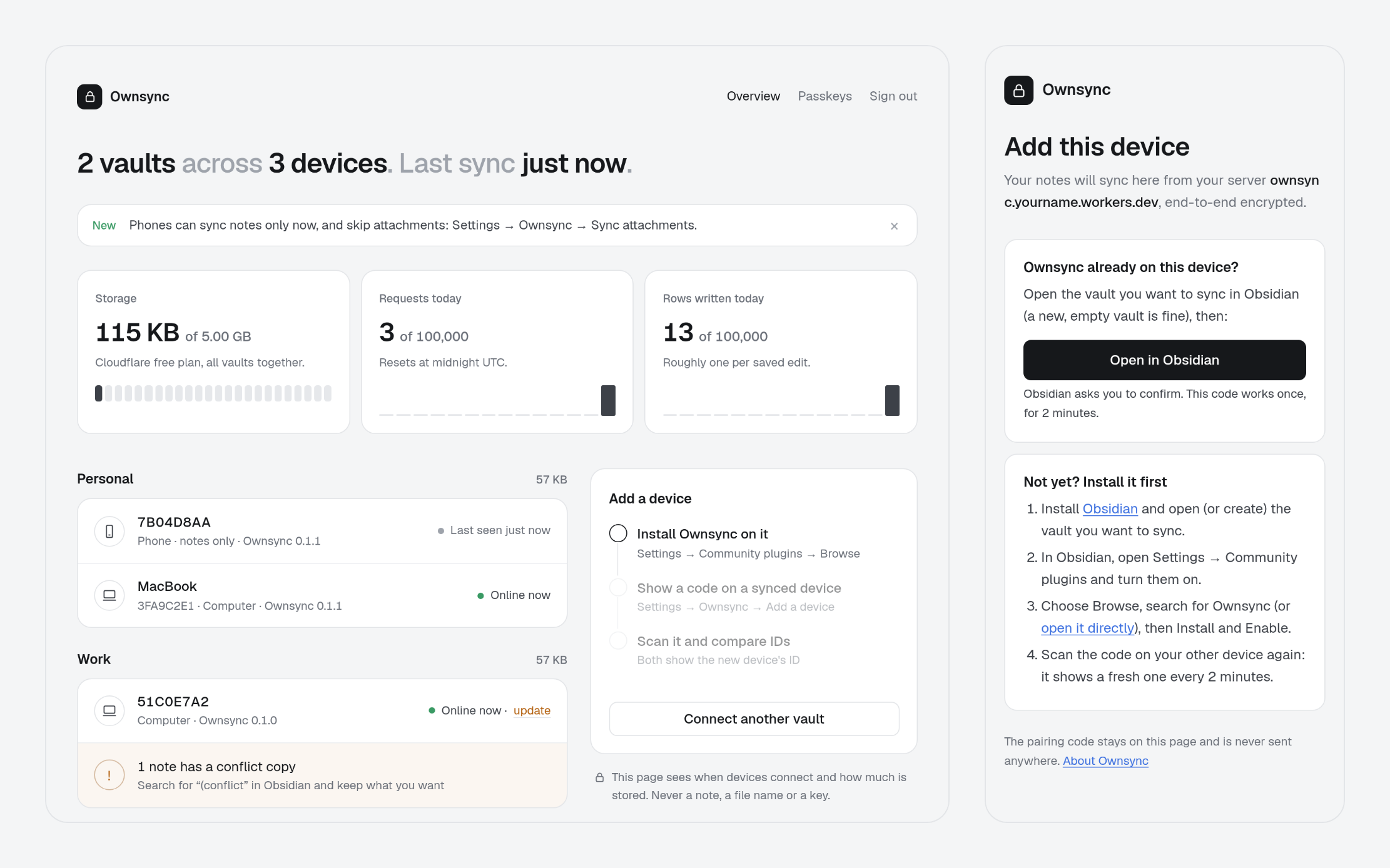
What's new
Setup that fills in as you go. After the setup key and your passkey, setup walks through four short steps: add a passkey, connect your first vault, add your phone, done. Your dashboard fills in beside them as each device connects, so you can see it working.
A calmer dashboard. It opens with one sentence, like "2 vaults across 3 devices. Last sync just now." Then:
- Usage: storage, plus the last two weeks of requests and rows written against Cloudflare's free plan.
- Devices: each one, phone or computer, with whether it syncs notes only, when it was last seen, and its version.
- Conflict copies: shown quietly, with how to sort them out.
- One typeface throughout.
Name your devices. Every device still starts with its random ID. Click it on the dashboard to give it a name you'll recognise.
Notes only, per device. When a device connects, Ownsync asks whether it should sync attachments too. Your phone can skip images and PDFs, while your laptop keeps everything. A notes-only device never deletes attachments on your other devices. You can change your mind any time in Settings → Ownsync → Sync attachments.
Honest usage numbers. Cloudflare counts 20 messages from your devices as one request; the dashboard now does too, so the meter no longer reads about 20 times too high.
Updating
- The plugin: replace
main.js,manifest.jsonandstyles.cssin.obsidian/plugins/ownsync/with the files below. It works with a 0.1.0 server too. - The new site comes with the server, so a server deployed before today keeps the old dashboard until it's redeployed from the latest code.
Still early
I'm the only one testing Ownsync so far, so keep a backup of your vault while you try it. Something off? Open an issue.
The first release of Ownsync: real-time sync for Obsidian, end-to-end encrypted, through a server you own.
It's early. I'm testing it on my own vault and phone this week, and it will improve quickly over the coming days. If something feels off, open an issue.
What's in it
Sync that feels live. Edits show up on your other devices in under a second. With a note open on two devices, each shows the other's cursor, and undo only takes back your own typing.
Private by design. Every edit is encrypted on your device before it leaves. Only your devices hold the key; your server stores scrambled data and couldn't read a note if it tried.
Offline first. Edit anywhere. Changes merge word by word when you're back. Nothing is thrown away: anything that can't merge is kept as a conflict copy.
Your own server. One click deploys it to a free Cloudflare account. One server holds as many vaults as you like, each with its own key.
Attachments too. Images, PDFs and other files, up to 20 MB each, encrypted in pieces and stored once.
Simple setup.
- Deploy, then enter your setup key on your server's page and add a passkey. The setup key works once, in the first 10 minutes.
- Install Ownsync in Obsidian, press Open in Obsidian on your dashboard, and connect.
- Add a phone by scanning a one-time QR code. Both devices show the new device's ID so you can check it's yours.
A dashboard. Your devices by their random ID, when each was last online and which version it runs, conflict copies, and how much of Cloudflare's free plan you use.
Lost a device? Remove it, and the vault gets a new key the lost device doesn't have. Lost every device? Your recovery kit brings the vault back.
Tested
- 1,000-note vault in real Obsidian: first sync in 3.0 s, a new device ready in 4.2 s, typing across devices in 65 ms.
- The sync engine imports 10,000 notes in 3.6 s.
- 500,000 random edits, renames, crashes and reconnects across three devices, and not one note lost.
Installing this release
Ownsync isn't in Obsidian's community plugin browser yet; it's on its way. Until then, put the three files below (main.js, manifest.json, styles.css) into <your vault>/.obsidian/plugins/ownsync/, then enable Ownsync under Settings → Community plugins. The setup guide covers the rest.
Coming next
- A listing in Obsidian's community plugins, for a one-click install
- Real-world testing on phones, and on vaults of 10,000+ notes
- Freeing the space of attachments you delete or replace
- Polish from whatever this week's testing turns up